A rewrite, a meter fix, a Suno tagging pass or an audio analysis can take from a few seconds to a few minutes. The work runs on Heho's servers while you keep writing. The studio shows what is running, and the bell tells you when each job ends.
1. See what is running
While a job runs, a pill at the top right of the studio names it, such as Lyrics rewrite, Fix meter, Sync metrics, Audio analysis or Optimizing tags. Jobs of the same kind share one pill with a count, such as Sync metrics (3). The pill goes away when the last one ends.
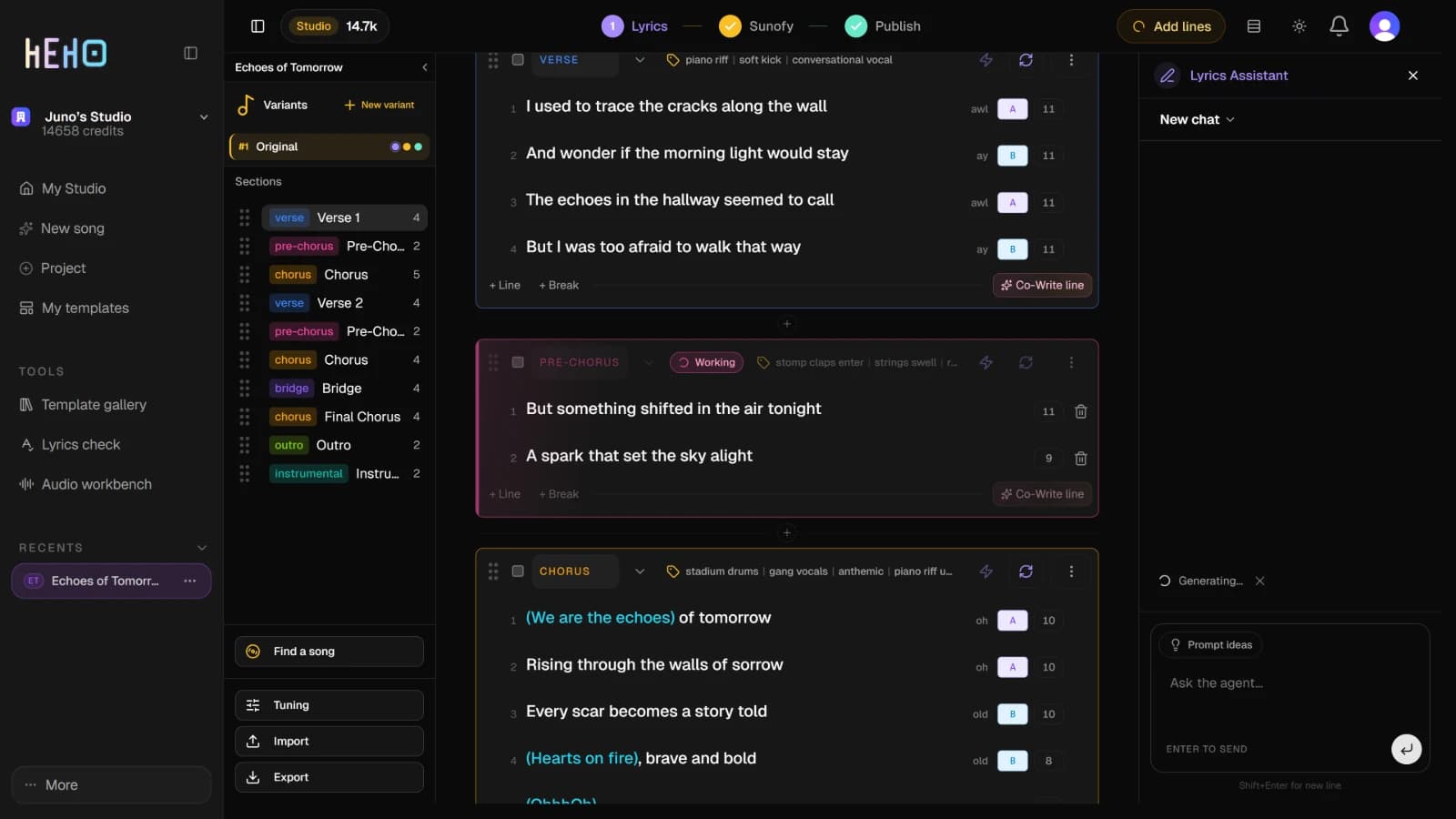
A section the Lyrics Assistant is rewriting or writing shows Working in its header, and its lines are locked until the job ends. Rewrite section, Fix meter, Add lines, Write section and Co-Write line also show Generating... in the Lyrics Assistant panel.
2. Keep writing
You can edit other sections, or move between the song's tabs, while a job runs. Asking for the same action on the same section again does nothing until the first one ends, and uses no credits. Sync metrics tells you so: Metrics sync is already running for this section.
The result lands where you asked for it. A rewrite or a meter fix comes back as a card in the Lyrics Assistant panel, which Review AI changes before they land walks through.
3. Reload or come back later
The studio checks on each job while the song is open and its tab is in front. If you reload, or close the tab and open the song again, it picks up every job that is still running and goes on waiting for it.
Some work cannot be picked up:
- A job that had not reached the server when the page closed, and a Suno Assistant action, which streams into the open page. The studio stops waiting for them and marks them failed.
- A job still open when you come back to the song 10 minutes or more after it started, or 20 for synced lyrics. It is dropped with no notification, even if it finished while the song was closed, and you run it again.
A Rewrite preview card you had not approved or rejected comes back after a reload, for up to a day.
4. Get told when a job ends
When a job ends, the bell at the top right gets a notification, such as Lyrics rewrite completed or Fix meter failed, with the song and the variant under it. Most carry a tag naming their tab: Lyrics, Suno or Publish. Click the notification to open the song on that tab and variant.
Closing the list marks everything in it as read. Archive, the box icon on a row, takes it off the list.
The bell icon in the list's header turns on Desktop alerts, after your browser asks for permission. They do not fire for a finished job yet: Heho stops checking on jobs while its tab is in the background, so the job's notification appears in the bell when you come back to the tab. If the browser blocks notifications, the icon's label reads Blocked by browser.
NoteHeho records the end of a job from the open studio. With the song closed, or its tab in the background, the notification waits until you come back to it.
5. When a job looks stuck
With the song open, a job with no answer five minutes after it started is marked failed, with a message that starts Job timed out. Synced lyrics get 15 minutes. The failure shows in the bell, for a rewrite or a meter fix in the Lyrics Assistant panel too, and for an audio analysis at the foot of the left column.
If the pill stays and nothing changes, reload the song once. The studio then asks the server again about every job still open. A job that failed has to be run again.
Your credit balance, beside the plan name at the top left, updates a few seconds after a job ends.